iVault: Photo Vault, Hide Pics8.7.2
Publisher Description



iVault - The Smartest Way to Hide Photos, Lock Videos & Protect Files, Contacts
Looking for a secure photo vault to hide your private photos and videos? Start protecting your privacy in seconds with iVault. iVault is the most advanced and trusted photo locker and file vault designed to hide photos, lock videos, and protect sensitive files with Face ID, Touch ID, and powerful encryption.
Your public gallery stays clean while your private photos, videos, and documents are hidden behind a secure vault only you can access.
► Powerful Vault Features for Maximum Privacy
Lock & Hide Photos, Videos, and Files
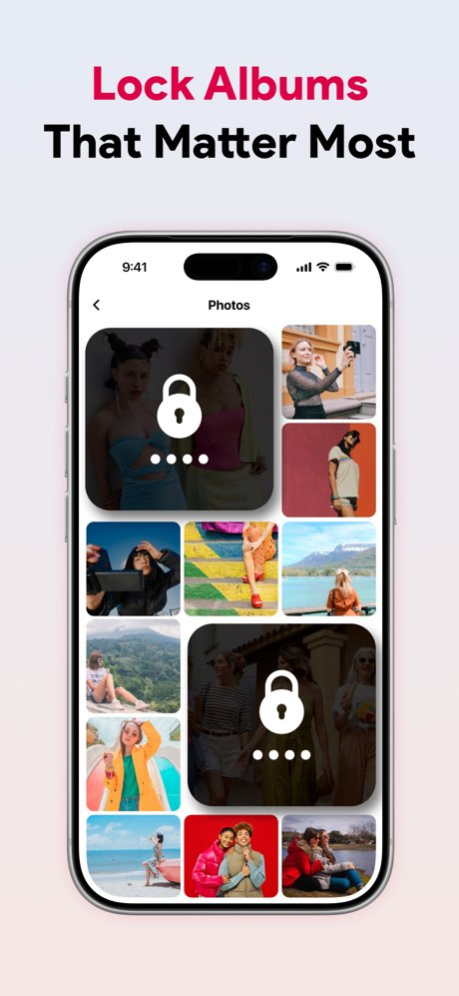
. Lock personal photos, videos & albums in a secure photo vault
. Hide private files, documents & folders in a secure folder
. Protect with Face ID, Touch ID & passcode lock
. Album-level security with individual passcodes
Intruder Detection & Fake Vault
. Intruder selfie: Take a photo when someone tries to break in
. Fake PIN: Create a decoy vault to mislead intruders
. Face-down auto-lock: Quickly switch to another app when phone is face down
Disguised Icon & Calculator Vault
. Disguise app as a real calculator (calculator vault mode)
. Hide the vault app from plain sight with icon disguise
Smart Storage, Contact Vault & Cloud Backup
. Hide and lock personal photos, videos, files & contacts with strong encryption
. Disguise iVault as a calculator or other icon for private access
. Store private contacts separately from your phonebook
. Dropbox integration for private, encrypted cloud backups
. Built-in password manager for secure login storage
. Trash & restore feature to recover deleted files
. Backup your files and contacts with encrypted sync
Easy to Use & Fully Customizable
. Clean and modern UI built for privacy-focused users
. Dark mode support for a comfortable viewing experience
. 20+ vibrant themes to personalize your vault
. Slideshow mode to relive memories in your private gallery
Why Millions Trust iVault
. Hide photos and videos in a military-grade encrypted photo vault
. Protect sensitive documents, folders & media in a secure locker
. Use decoy mode, icon disguise, and intruder alerts for complete privacy
. Enjoy a smooth, customizable interface built for daily use
. Trusted by users in the US, UK, Canada, and Australia
. Unlike most vault apps, iVault also lets you hide private contacts-perfect for managing confidential relationships or business connections discreetly.
Download iVault Today
Whether you're looking to hide private photos, lock secret videos, or secure files from prying eyes, iVault gives you full control of your digital privacy.
iVault is perfect for anyone who values security, simplicity, and peace of mind. Don’t leave your personal memories exposed. Download iVault today and take full control of your digital privacy.
Have questions or suggestions? Reach us anytime at sundaylab.apps@gmail.com.
iVault Premium
iVault includes optional premium features, available as monthly or yearly subscriptions. Payment will be charged to your iTunes account at confirmation. Your subscription will auto-renew unless canceled at least 24 hours before the end of the billing period. Manage or cancel anytime via your App Store account.
Terms of Use:
https://bodrya-hardik.blogspot.com/2024/12/terms-of-service-ivault.html
Privacy Policy:
https://bodrya-hardik.blogspot.com/2024/12/privacy-policy-ivault.html
Version History - Bug fixes and performance improvements 8.7.2 Sep 1 - Bug fixes and performance improvements 8.7.1 Jul 8 - Bug fixes and performance improvements 8.7.0 May 19 - Bug fixes and performance improvements 8.6.9 May 14 - Bug fixes and performance improvements 8.6.8 Apr 16 - Bug fixes and performance improvements 8.6.7 Mar 10 - Bug fixes and performance improvements 8.6.6 Mar 3 - Bug fixes and performance improvements 8.6.5 Feb 2 - Bug fixes and performance improvements 8.6.4 Jan 8 - Bug fixes and performance improvements 8.6.3 Jan 2 - Bug fixes and performance improvements 8.6.2 11/13/2025 - Bug fixes and performance improvements 8.. 11/02/2025 - Bug fixes and performance improvements 8.6 10/20/2025 - Bug fixes and performance improvements 8.5 10/15/2025 - Bug fixes and performance improvements 8.4 10/04/2025 • We’ve added support for iOS 26!
• Bug fixes and performance improvements 8.3 09/28/2025 Performance improvements and bug fixes for a smoother, more reliable experience. 8.2 09/05/2025 Performance improvements and bug fixes for a smoother, more reliable experience. 8.1 08/26/2025 New! Hide your private documents and contacts easily. Keep all your sensitive data safe and secure with enhanced vault protection. 8.0 08/08/2025 - Minor bug fixes. 7.8 04/30/2025 - Minor bug fixes and performance improvements. 7.7 03/10/2025 - Minor bug fixes and performance improvements. 7.6 02/15/2025 - Bug fixes and performance improvements. 7.5 02/13/2025 - Bug fixes and performance improvements. 7.4 01/26/2025 - Bug fixes and performance improvements. 7.3 01/24/2025
About iVault: Photo Vault, Hide Pics
The company that develops iVault: Photo Vault, Hide Pics is Bodrya Hardikkummar Vinodbhai. The latest version released by its developer is 8.7.2.
To install iVault: Photo Vault, Hide Pics on your iOS device, just click the green Continue To App button above to start the installation process. The app is listed on our website since 2026-10-14 and was downloaded 14 times. We have already checked if the download link is safe, however for your own protection we recommend that you scan the downloaded app with your antivirus. Your antivirus may detect the iVault: Photo Vault, Hide Pics as malware if the download link is broken.
How to install iVault: Photo Vault, Hide Pics on your iOS device:
- Click on the Continue To App button on our website. This will redirect you to the App Store.
- Once the iVault: Photo Vault, Hide Pics is shown in the iTunes listing of your iOS device, you can start its download and installation. Tap on the GET button to the right of the app to start downloading it.
- If you are not logged-in the iOS appstore app, you'll be prompted for your your Apple ID and/or password.
- After iVault: Photo Vault, Hide Pics is downloaded, you'll see an INSTALL button to the right. Tap on it to start the actual installation of the iOS app.
- Once installation is finished you can tap on the OPEN button to start it. Its icon will also be added to your device home screen.
Program Details
System requirements
Download information
Pricing
Version History
version 8.7.2
posted on 2026-10-14
Version History - Bug fixes and performance improvements 8.7.2 Sep 1 - Bug fixes and performance improvements 8.7.1 Jul 8 - Bug fixes and performance improvements 8.7.0 May 19 - Bug fixes and performance improvements 8.6.9 May 14 - Bug fixes and performance improvements 8.6.8 Apr 16 - Bug fixes and performance improvements 8.6.7 Mar 10 - Bug fixes and performance improvements 8.6.6 Mar 3 - Bug fixes and performance improvements 8.6.5 Feb 2 - Bug fixes and performance improvements 8.6.4 Jan 8 - Bug fixes and performance improvements 8.6.3 Jan 2 - Bug fixes and performance improvements 8.6.2 11/13/2025 - Bug fixes and performance improvements 8.. 11/02/2025 - Bug fixes and performance improvements 8.6 10/20/2025 - Bug fixes and performance improvements 8.5 10/15/2025 - Bug fixes and performance improvements 8.4 10/04/2025 • We’ve added support for iOS 26!
• Bug fixes and performance improvements 8.3 09/28/2025 Performance improvements and bug fixes for a smoother, more reliable experience. 8.2 09/05/2025 Performance improvements and bug fixes for a smoother, more reliable experience. 8.1 08/26/2025 New! Hide your private documents and contacts easily. Keep all your sensitive data safe and secure with enhanced vault protection. 8.0 08/08/2025 - Minor bug fixes. 7.8 04/30/2025 - Minor bug fixes and performance improvements. 7.7 03/10/2025 - Minor bug fixes and performance improvements. 7.6 02/15/2025 - Bug fixes and performance improvements. 7.5 02/13/2025 - Bug fixes and performance improvements. 7.4 01/26/2025 - Bug fixes and performance improvements. 7.3 01/24/2025
version 8.7.2
posted on 2026-09-04
Version History - Bug fixes and performance improvements 8.7.2 3d ago - Bug fixes and performance improvements 8.7.1 Jul 8 - Bug fixes and performance improvements 8.7.0 May 19 - Bug fixes and performance improvements 8.6.9 May 14 - Bug fixes and performance improvements 8.6.8 Apr 16 - Bug fixes and performance improvements 8.6.7 Mar 10 - Bug fixes and performance improvements 8.6.6 Mar 3 - Bug fixes and performance improvements 8.6.5 Feb 2 - Bug fixes and performance improvements 8.6.4 Jan 8 - Bug fixes and performance improvements 8.6.3 Jan 2 - Bug fixes and performance improvements 8.6.2 11/13/2025 - Bug fixes and performance improvements 8.. 11/02/2025 - Bug fixes and performance improvements 8.6 10/20/2025 - Bug fixes and performance improvements 8.5 10/15/2025 - Bug fixes and performance improvements 8.4 10/04/2025 • We’ve added support for iOS 26!
• Bug fixes and performance improvements 8.3 09/28/2025 Performance improvements and bug fixes for a smoother, more reliable experience. 8.2 09/05/2025 Performance improvements and bug fixes for a smoother, more reliable experience. 8.1 08/26/2025 New! Hide your private documents and contacts easily. Keep all your sensitive data safe and secure with enhanced vault protection. 8.0 08/08/2025 - Minor bug fixes. 7.8 04/30/2025 - Minor bug fixes and performance improvements. 7.7 03/10/2025 - Minor bug fixes and performance improvements. 7.6 02/15/2025 - Bug fixes and performance improvements. 7.5 02/13/2025 - Bug fixes and performance improvements. 7.4 01/26/2025 - Bug fixes and performance improvements. 7.3 01/24/2025
version 8.7.1
posted on 2026-08-23
Version History - Bug fixes and performance improvements 8.7.1 Jul 8 - Bug fixes and performance improvements 8.7.0 May 19 - Bug fixes and performance improvements 8.6.9 May 14 - Bug fixes and performance improvements 8.6.8 Apr 16 - Bug fixes and performance improvements 8.6.7 Mar 10 - Bug fixes and performance improvements 8.6.6 Mar 3 - Bug fixes and performance improvements 8.6.5 Feb 2 - Bug fixes and performance improvements 8.6.4 Jan 8 - Bug fixes and performance improvements 8.6.3 Jan 2 - Bug fixes and performance improvements 8.6.2 11/13/2025 - Bug fixes and performance improvements 8.. 11/02/2025 - Bug fixes and performance improvements 8.6 10/20/2025 - Bug fixes and performance improvements 8.5 10/15/2025 - Bug fixes and performance improvements 8.4 10/04/2025 • We’ve added support for iOS 26!
• Bug fixes and performance improvements 8.3 09/28/2025 Performance improvements and bug fixes for a smoother, more reliable experience. 8.2 09/05/2025 Performance improvements and bug fixes for a smoother, more reliable experience. 8.1 08/26/2025 New! Hide your private documents and contacts easily. Keep all your sensitive data safe and secure with enhanced vault protection. 8.0 08/08/2025 - Minor bug fixes. 7.8 04/30/2025 - Minor bug fixes and performance improvements. 7.7 03/10/2025 - Minor bug fixes and performance improvements. 7.6 02/15/2025 - Bug fixes and performance improvements. 7.5 02/13/2025 - Bug fixes and performance improvements. 7.4 01/26/2025 - Bug fixes and performance improvements. 7.3 01/24/2025 - Polished UI for a smoother experience.
- Bug Fixes & Performance Improvements for better reliability.
Have suggestions or need help? Email us at sundaylab.apps@gmail.com. 7.2 01/07/2025
version 8.7.0
posted on 2026-06-30
Version History - Bug fixes and performance improvements 8.7.0 May 19 - Bug fixes and performance improvements 8.6.9 May 14 - Bug fixes and performance improvements 8.6.8 Apr 16 - Bug fixes and performance improvements 8.6.7 Mar 10 - Bug fixes and performance improvements 8.6.6 Mar 3 - Bug fixes and performance improvements 8.6.5 Feb 2 - Bug fixes and performance improvements 8.6.4 Jan 8 - Bug fixes and performance improvements 8.6.3 Jan 2 - Bug fixes and performance improvements 8.6.2 11/13/2025 - Bug fixes and performance improvements 8.. 11/02/2025 - Bug fixes and performance improvements 8.6 10/20/2025 - Bug fixes and performance improvements 8.5 10/15/2025 - Bug fixes and performance improvements 8.4 10/04/2025 • We’ve added support for iOS 26!
• Bug fixes and performance improvements 8.3 09/28/2025 Performance improvements and bug fixes for a smoother, more reliable experience. 8.2 09/05/2025 Performance improvements and bug fixes for a smoother, more reliable experience. 8.1 08/26/2025 New! Hide your private documents and contacts easily. Keep all your sensitive data safe and secure with enhanced vault protection. 8.0 08/08/2025 - Minor bug fixes. 7.8 04/30/2025 - Minor bug fixes and performance improvements. 7.7 03/10/2025 - Minor bug fixes and performance improvements. 7.6 02/15/2025 - Bug fixes and performance improvements. 7.5 02/13/2025 - Bug fixes and performance improvements. 7.4 01/26/2025 - Bug fixes and performance improvements. 7.3 01/24/2025 - Polished UI for a smoother experience.
- Bug Fixes & Performance Improvements for better reliability.
Have suggestions or need help? Email us at sundaylab.apps@gmail.com. 7.2 01/07/2025 We’re back with exciting updates and improvements just for you!
- Fresh Interface: Redesigned for a seamless experience.
- Tougher Security: Your data, safer than ever.
- Boosted Performance: Faster and more efficient.
Update now to enjoy the new and improved iVault! 7.1 12/31/2024
version 8.6.7
posted on 2026-03-10
- Bug fixes and performance improvements
version 8.6
posted on 2025-10-20
Oct 20, 2025
Version 8.6
- Bug fixes and performance improvements
version 8.1
posted on 2025-08-26
Aug 26, 2025
Version 8.1
Performance improvements and bug fixes for a smoother, more reliable experience.
version 7.8
posted on 2025-04-30
Apr 30, 2025
Version 7.8
- Minor bug fixes.
version 7.7
posted on 2025-03-10
Mar 10, 2025
Version 7.7
- Minor bug fixes and performance improvements.
version 3.1
posted on 2021-11-22
Nov 22, 2021 Version 3.1
- Bug fixes and performance improvements.
